
Every performance marketer knows the rule: the creative is the targeting now. The accounts that win are the ones that can feed the algorithm a steady stream of fresh hooks, in every placement shape, without the production budget exploding. The bottleneck is rarely ideas. It is turning ten ideas into ten testable videos before the current winner fatigues.
So I ran a production test for a fictional direct-to-consumer brand selling a plain teal insulated water bottle. The goal was the kind of batch I would actually launch: several hook variations from one product photo, versions for vertical, square and landscape placements, a lifestyle scene, and a few length and resolution checks. Everything was generated, timed and costed on 17 November 2026.
The Setup
The model was Vidu Q4 (model ID viduq4-preview), which turns images into 3 to 16 second clips with sound. It has two modes. Image-to-video animates one photo as the first frame, with an optional prompt. Reference-to-video takes 1 to 15 reference images plus a required prompt and builds a new scene around them. There is no text-only mode, which suits ad work: you always start from your real product. Resolutions run from 540p to 4K, audio is on by default, and you pay per second of output.
At the listed rates, a 5-second clip costs $0.22 at 540p, $0.46 at 720p, $0.51 at 1080p, $0.81 at 2K and $1.66 at 4K. Silent output costs the same as audio. Failed tasks are refunded, so you only pay for clips that render.
The product stills came from an image model: one vertical hero shot of the bottle on a wet rock in a stream, then square and wide recompositions of the same scene ($0.05 for all three). In a real account you would use your own product photography. The batch itself is a short loop:
import requests
API = “https://api.apimart.ai/v1“
H = {“Authorization”: f”Bearer {API_KEY}”}
hooks = {
“splash”: “A burst of icy stream water splashes against the bottle in slow motion…”,
“grab”: “A hiker’s hand reaches into frame, grabs the bottle and lifts it out of frame…”,
“pushin”: “Fast dramatic push-in on the bottle as golden morning sun flares behind it”,
}
tasks = {}
for name, prompt in hooks.items():
body = {“model”: “viduq4-preview”, “image_urls”: [HERO_916_URL],
“prompt”: prompt, “duration”: 5, “resolution”: “540p”}
r = requests.post(f”{API}/videos/generations”, json=body, headers=H, timeout=60)
tasks[name] = r.json()[“data”][0][“task_id”]
then poll GET {API}/tasks/{task_id} until status is “completed”
I kept three jobs running at a time. Every clip came back between 105 and 187 seconds after submission.
Test 1: Five Hooks From One Product Photo
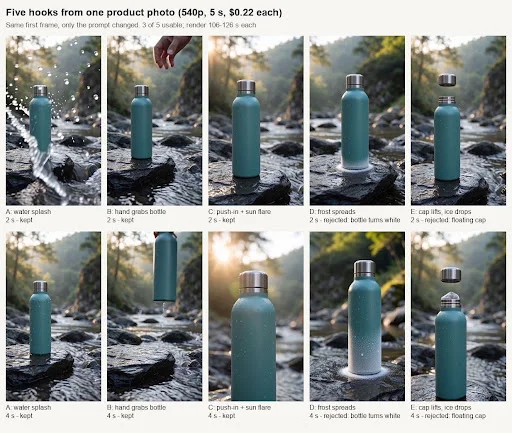
Same first frame, five different openings: a water splash, a hand grabbing the bottle, a dramatic push-in with sun flare, frost spreading over the bottle, and the cap lifting off as ice cubes drop in.
Three of five hooks were usable. Frost turned the product white; the ice-cube idea broke physics.
Three of the five were ready to test. The splash delivers the movement in the first 2 seconds, exactly where a thumb-stopping hook needs it. The hand grab is clean and human. The push-in with flare looks like a proper hero shot.
The two failures are instructive. The frost hook looked great as a visual, but it turned the lower half of the teal bottle white, so it showed a product that doesn’t exist. That is a compliance problem, not a style choice, and I rejected it. The ice-cube hook asked for a sequence of physical actions; the cap floated in mid-air and an ice cube appeared from nowhere. Single, simple motions work. Multi-step mechanics don’t.
Cost per usable hook at 540p: $1.12 for five clips, three kept, so $0.37 each.
Test 2: Placement Shapes
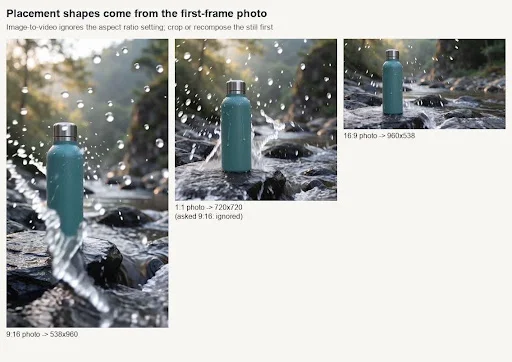
For image-to-video, the output shape follows the photo you supply, and the aspect ratio setting is ignored. The parameter notes on the Vidu Q4 API page say so, and I confirmed it: I fed the square photo while asking for 9:16, and got a 720×720 clip.
9:16 photo gave 538×960, 1:1 gave 720×720, 16:9 gave 960×538. Shape follows the first frame.
So the practical workflow is: produce your still in every placement shape first, then animate each one. Running the splash hook on all three gave three usable placements for $0.67. The motion differed slightly between them, which is fine for testing. In the wide version, water ran down the bottle in a visible trail that wasn’t in the vertical one.
Test 3: A Lifestyle Scene From A Product Reference
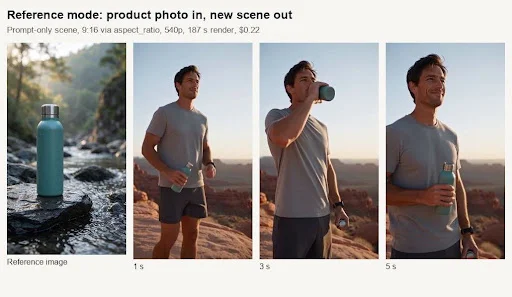
Reference mode lets you place the product into a scene the photo doesn’t contain. I gave the bottle photo as a reference and described a trail runner on a red-rock desert ridge stopping to drink, at 9:16.
Reference mode: 540p, 5 seconds, 187 seconds to render, $0.22.
The scene, the action and the vertical format all came out as requested, and the bottle kept its teal colour and steel cap. At this size the product is small in frame, so I would use this as a “context” variant rather than a product hero. The runner is a generated person, which matters for disclosure (more below). This was also the slowest render at 187 seconds, and its soundtrack was much quieter than the rest (−36 dB mean versus around −19 dB).
Suggested Read: AI Video Editing Software
Test 4: Length
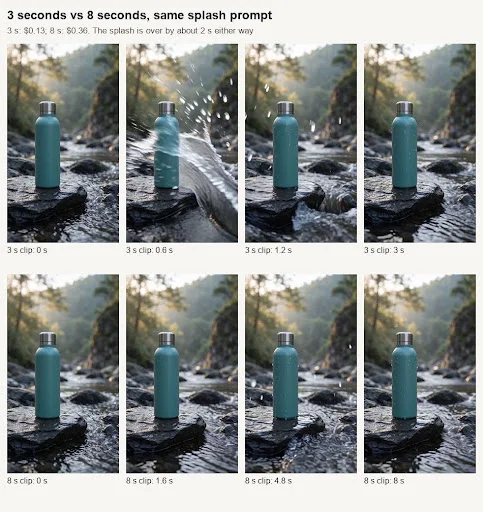
The action is over by about 2 seconds whatever length you request.
The 3-second version (0.13)wasthetightestcutoftheday.The8-secondversion(0.36) put the same splash in the first 2 seconds and then held a near-static shot for 5 more. Longer clips don’t automatically get more action; you need to write more beats into the prompt.
Test 5: Resolution And Audio
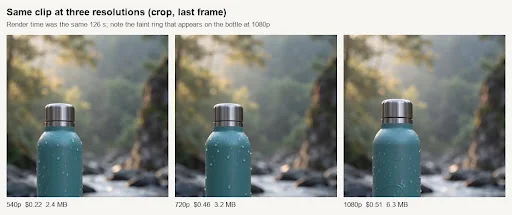
All three rendered in about the same time. 1080p added a faint ring on the bottle.
The 720p and 1080p renders took 126 seconds each, the same as the slowest 540p hook. 720p is clearly crisper on the water droplets; the jump to 1080p is small on a phone, and that version added a faint circular mark on the bottle that isn’t on the real product. My rule: test hooks at 540p, re-render winners at 720p, and inspect any higher-resolution render as carefully as the first. Turning audio off gave a clip with no audio track at all, at the same price. Useful when the platform plays muted by default and you add your own music.
The Scorecard
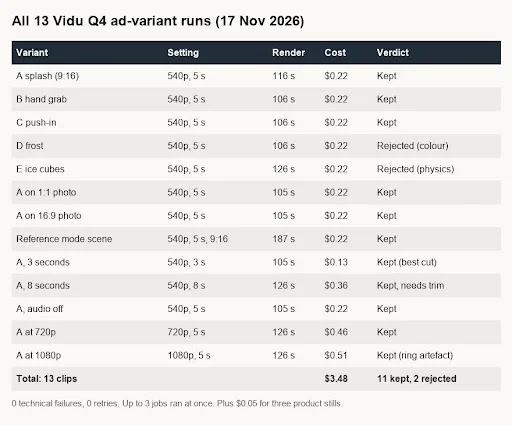
13 runs, 0 technical failures, 11 kept, $3.48.
Thirteen clips, $3.48, no technical failures and no retries. Creative failure rate was 2 out of 13 (15%), both caused by prompts that changed the product or required complex mechanics. With the stills included, the whole test cost $3.53, or about $0.32 per usable variant.
Fatigue Refresh Cadence
Cheap variants change how you handle fatigue. Instead of waiting for frequency to climb and CTR to slide, I would run it like this:
- Weekly: generate 5 to 8 new hooks on the current best-selling product photo at 540p. Expect 3 to 5 usable ones. Budget under $3.
- Launch: put the usable hooks into a test ad set against the current control. Keep only placements where you have the matching still.
- Promote: re-render the winner at 720p in every placement shape.
- Retire: when the winner’s CTR drops by a third from its first-week level, the next batch should already be waiting.
Disclosure And Ad Policies
The major ad platforms all prohibit misleading product representation, and several require disclosure of synthetic or altered media in certain ad categories. Rules change often, so check each platform’s current policy before launch. My own guardrails for AI ad variants:
- The product must look exactly as it ships. Reject any clip that changes colour, shape, finish or size, like the frost hook.
- Generated people should not be presented as real customers giving testimonials.
- No implied performance claims (temperature, durability) shown only by AI visuals.
- Label AI-generated scenes when the platform asks, and keep a log of prompts and task IDs for every live ad.
Used that way, AI video doesn’t replace your product shoot. It multiplies it: one good photo becomes a week of testable hooks for less than the cost of a coffee.